yFiles for Java
Release Notes

Next-generation yFiles for Java (Swing)
or higher
Beginning with version 3.0, the yFiles for Java (Swing) diagramming library features a brand-new, modern API which requires Java 8. This API is mature and provides many new features that are not available out-of-the-box in the 2.x line. It also provides the functionality of the ySVG, yExport and yBPMN package as source code application, therefore the extension packages are no longer required.
We recommend to start development with the next-generation yFiles for Java in new Java Swing projects.
Especially in projects that don't need to support legacy Java versions before Java 8, this
is the recommended way to realize your application's diagram visualization part.
Release Notes
yFiles for Java version 2.18 is the newest major release available in the yFiles for Java 2.x technology line.
It contains many exciting new features compared to older versions and is almost completely API compatible with the 2.17 series.
(See also the entire yFiles for Java change log.)
Technical Requirements
- Oracle J2SDK 1.4 or higher is needed for software development with yFiles.
- Oracle J2RE 1.4 or higher is needed to execute programs using yFiles.
- A browser to view the HTML documentation.
yFiles 2.18 - Changes Since 2.17
New layout support for node types
New support for rerouting of edge paths
New Features
Layout
- Added new scope SCOPE_MAINLY_SUBSET_GEOMETRIC for the organic layout algorithm. In addition to the actual subset nodes, this scope may to some degree move nodes that are geometrically close to one of the nodes in the actual subset. The existing scope SCOPE_MAINLY_SUBSET is similar, but it does determine the closeness of other nodes by using the graph structure and not the current geometry (i.e. location).
- The SmartOrganicLayouter has a new clustering policy property, which allows to specify the clustering algorithm that is applied (if any). Three clustering algorithms, namely louvain modularity, edge betweenness and label propagation are offered. See setClusteringPolicy. Previously, the automatic clustering was always based on edge betweenness. By default, the automatic clustering is disabled (CLUSTERING_POLICY_NONE).
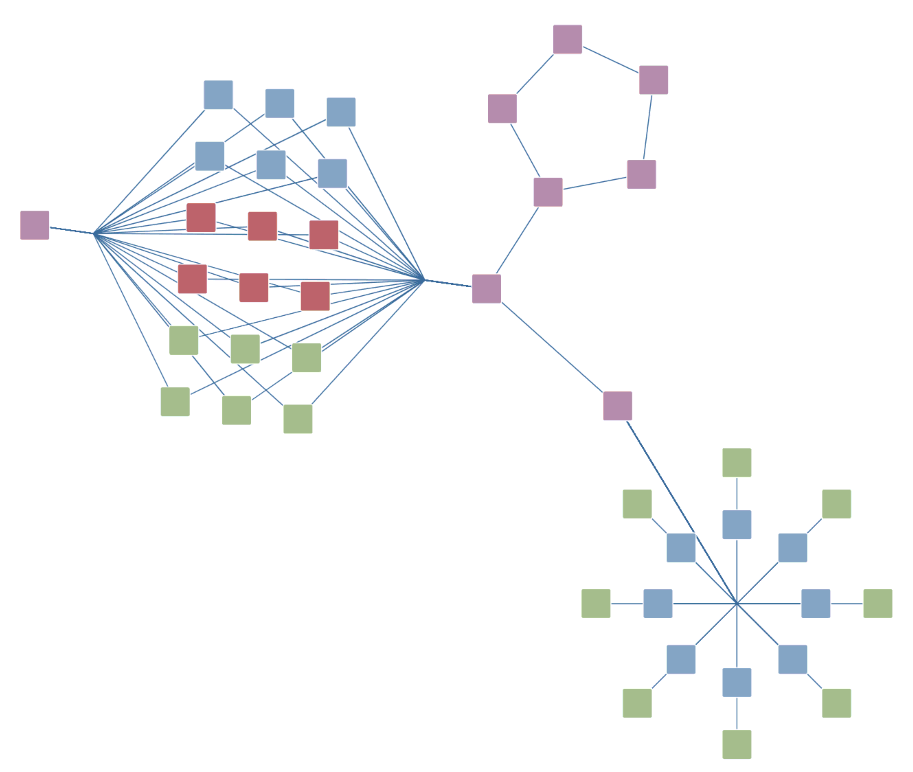
- The SmartOrganicLayouter now allows to define node types that control the detection of substructures (e.g. stars, parallel structures). When types are defined, only nodes of the same type can form a substructure. To define types, register a data provider with the graph with key NODE_TYPE_DPKEY. For star-like and parallel substructures, it is also possible to have a single substructure with nodes of different types, see properties setParallelSubstructureTypeSeparationEnabled and setStarSubstructureTypeSeparationEnabled. The algorithm still tries to highlight the different types by, e.g., placing nodes of the same type closer together or on the same circle.
- The OrthogonalLayouter and DirectedOrthogonalLayouter now allow to define node types that control the detection of substructures (i.e. trees, chains, cycles). When types are defined, only nodes of the same type can form a substructure. To define types, register a data provider with the graph with key NODE_TYPE_DPKEY.
- The GenericTreeLayouter and TreeLayouter now support node types. The types influence the ordering of child nodes and the subtrees rooted at them such that nodes of the same type are preferably placed next to each other. Node types are a weak criterion, i.e., if the ordering is given by other constraints, these are prioritized. To define types, register a data provider with the graph with key NODE_TYPE_DPKEY.
- The IncrementalHierarchicLayouter now supports node types. The types influence the ordering of nodes within their layers as a subordinate optimization criteria. More precisely, nodes of the same type are more likely to be placed next to each other if this does not violate with other constraints.
- Added NodeTypeAwareSequencer that can be specified for the SingleCycleLayouter and ensures that the nodes of a circle are separated by type.
- The ComponentLayouter now supports node types. The types influence the arrangement and ordering of the the components such that components consisting mostly of nodes of the same type are put close to other components consisting of nodes of that type. To define types, register a data provider with the graph with key NODE_TYPE_DPKEY.
-
EdgeRouter, BusRouter and
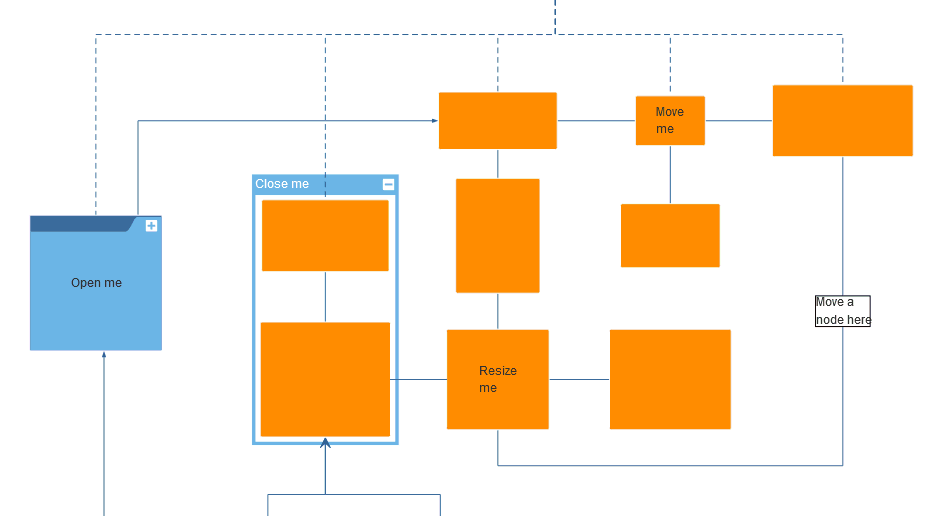
ChannelEdgeRouter: Added a feature that automatically determines whether or not a new path
should be calculated for a certain edge. The feature is controlled via the new routing policy properties, see
EdgeLayoutDescriptor.setRoutingPolicy,
BusDescriptor.setRoutingPolicy and
ChannelEdgeRouter.setRoutingPolicy respectively.
The decision is based on the quality of the existing routes - edges with strict violations
of the routing style or that intersect other elements will be selected for routing.
- ROUTING_POLICY_ALWAYS: old and default behavior, a new route is calculated in any case
- ROUTING_POLICY_PATH_AS_NEEDED: automatic selection - once selected, the existing path of the route is not further considered when computing the new route.
- ROUTING_POLICY_SEGMENTS_AS_NEEDED: automatic selection and an emphasis on preserving the existing path as much as possible. Only the required segments are changed. This policy is not supported by BusRouter and ChannelEdgeRouter.
- EdgeRouter: Added the new penalty property setSketchViolationPenalty, which defines the cost for a deviation from the original edge path if the new routing policy is set to ROUTING_POLICY_SEGMENTS_AS_NEEDED.
- PartialLayouter: Added new property setMovingFixedElementsAllowed that specifies whether or not the algorithm may move fixed elements. This often yields a better layout quality even though the preservation of the mental map declines because the fixed elements can change their position.
Algorithms
- Added methods to find the parallel edges in a graph. See findParallelEdges and findParallelEdges.
Improvements
Layout
- TreeLayouter now supports specifying a minimum first/last segment length for the orthogonal routing style.
-
Improved the quality of the curved edge routing was improved with respect to various aspects and such that it
yields aesthetically nicer curves. To further configure the curve routing, the following settings were added.
- CurveShortcutsAllowed: if shortcuts are allowed, curves can become smoother and more direct but may violate other constraints (e.g. edge-to-edge distance). Available for IncrementalHierarchicLayouter (isCurveShortcutsAllowed), EdgeRouter (isCurveShortcutsAllowed), and CurveRoutingStage (isCurveShortcutsAllowed).
- CurveUTurnSymmetry: allows to specify the symmetry preference for u-turns (180 degree turns) of curved routes. The default is zero so that results are equal to previous results. Available for IncrementalHierarchicLayouter (getCurveUTurnSymmetry), EdgeRouter (getCurveUTurnSymmetry), and CurveRoutingStage (getCurveUTurnSymmetry).
- EdgeRouter: Improved the quality of the routing when the maximum duration is highly restricted or the algorithm is aborted via AbortHandler (i.e. it operates in the fastest possible mode). The quality improvements mainly affect cases with fixed port locations.
- EdgeRouter: Reduced the number of cases where it is not possible to insert an octilinear (i.e. diagonal) segment after/before the first/last segment of a route for edges with octilinear routing style.
-
EdgeRouter: Added new penalty properties
setAdjacentEdgeCrossingPenalty and
setSelfCrossingPenalty. They allow to define the costs for
crossings between adjacent edges and for crossings between line segments that actually belong to the same edge,
respectively. Previously, all crossings were covered by the existing property
setEdgeCrossingPenalty.
- By default, now, crossings of adjacent edges are more expensive than normal ones and self-crossings are the most expensive.
- Furthermore, the default values of properties setEdgeLengthPenalty and setGroupNodeCrossingPenalty were increased to obtain more balanced edge routing results.
- The scope SCOPE_MAINLY_SUBSET of the organic layout now works together with more other features and constraints. Previously, it e.g. had very little or no effect when a partition grid or an output restriction was defined.
- SmartOrganicLayouter: For substructures, the layout algorithm now often produces more compact results and comes with an improved placement of degree-one nodes.
-
SmartOrganicLayouter: For substructures, it is now possible to explicitly specify whether
structures are allowed to be nested or not. Previously, substructures were allowed to be nested by default.
New styles were added while the old styles now will not generated nested structures anymore.
- Star structures offer the new styles STAR_SUBSTRUCTURE_STYLE_RADIAL_NESTED and STAR_SUBSTRUCTURE_STYLE_CIRCULAR_NESTED.
- CHAIN_SUBSTRUCTURE_STYLE_RECTANGULAR_NESTED and CHAIN_SUBSTRUCTURE_STYLE_STRAIGHT_LINE_NESTED are the new styles for nested chains.
- CYCLE_SUBSTRUCTURE_STYLE_CIRCULAR_NESTED is the new style for nested cycles.
- SmartOrganicLayouter: It is now possible to define the minimum sizes of substructures (stars, chains, cycles and parallel structures). Structures of smaller size are not handled as a substructure. For each type of structure a new property was added: setStarSubstructureSize, setChainSubstructureSize, setCycleSubstructureSize and setParallelSubstructureSize.
- IncrementalHierarchicLayouter: Improved choice of port candidate for edges with multiple candidates. This new strategy often leads to less bends.
- IncrementalHierarchicLayouter: the paths of edges that cross borders of partition grid columns are now shorter in cases where there are no other obvious constraints that require the edge to be longer. This holds for the default vertical layout orientation; for a horizontal orientation, edges that cross borders of rows are affected by this improvement.
- ParallelEdgeLayouter: It is now possible to retrieve the parallel edges that the stage routed and that were hidden during the core layout. Register a data acceptor with the new key ROUTED_PARALLEL_EDGES_DPKEY and the parallel, non-leading edges will be marked.
- SubgraphLayouter: It is now possible to define which edges must be included/excluded in the subgraph. Previously, only nodes could be specified. To define which edges must be included, register a data provider with the new key SUBGRAPH_EDGES_DPKEY. By default, i.e., if now provider is registered, all edges are included.
Bugfixes
Layout
-
IncrementalHierarchicLayouter and SimplexNodePlacer:
Fixed a possible
NullPointerExceptionthat may be caused by an internal overflow for very wide layouts. - IncrementalHierarchicLayouter: Fixed a bug that led to cases where the halos of group nodes (see NodeHalo) were not considered correctly when a partition grid was defined.
- IncrementalHierarchicLayouter: Fixed a bug that caused misplaced edge labels for some rare cases with grouped edges.
- IncrementalHierarchicLayouter: Fixed a bug that could cause node-edge overlaps for some rare cases with grouped edges.
- IncrementalHierarchicLayouter: Fixed a bug that could cause non-orthogonal edge segments of same-layer edges for some cases in conjunction with integrated edge labeling and edge labels placed at the ports (PLACE_AT_SOURCE_PORT or PLACE_AT_TARGET_PORT).
- IncrementalHierarchicLayouter: Fixed a bug that caused that PortCandidates at same-layer edge were not correctly considered when edges additionally have labels that must be placed at the port (PLACE_AT_SOURCE_PORT or PLACE_AT_TARGET_PORT).
- IncrementalHierarchicLayouter: Fixed a bug that may have caused a broken edge grouping structure for short edges with the same source and target group id (see SOURCE_GROUPID_KEY and TARGET_GROUPID_KEY).
- IncrementalHierarchicLayouter: Fixed a bug that in some cases caused overlaps between large node labels and edge segments of other edges.
- IncrementalHierarchicLayouter: Fixed a bug that could cause overlaps between elements of a sub-component (see SUB_COMPONENT_ID_DPKEY) and edges that are not part of the component.
- IncrementalHierarchicLayouter: Fixed a bug which caused that an edge label's PreferredPlacementDescriptor was not correctly considered when additionally having edge groupings defined. It could, for example, happen that the edge label was placed on the wrong side of the edge.
- IncrementalHierarchicLayouter: Fixed a bug that sometimes caused violations of the uniform port distribution at group nodes (if enabled, see UNIFORM_PORT_ASSIGNMENT_GROUPS_DPKEY).
- IncrementalHierarchicLayouter: Fixed a bug that sometimes caused superfluous port overlaps if there are edges with strong port constraints.
-
IncrementalHierarchicLayouter: Fixed a possible
ArrayIndexOutOfBoundsExceptionif there are sub-components (see SUB_COMPONENT_ID_DPKEY) and curved edge routes. - IncrementalHierarchicLayouter: Fixed a bug that caused edge crossings when using PortCandidates with layout orientations other than TOP_TO_BOTTOM.
- IncrementalHierarchicLayouter: Fixed a bug that sometimes causes less compact results for grouped input graphs if the node compaction is enabled (see setNodeCompactionEnabled).
- IncrementalHierarchicLayouter: Fixed a bug that in some cases lead to results where the specified critical edges (see CRITICAL_EDGE_DPKEY) were not considered correctly if the input graph contained grouped edges (see SOURCE_GROUPID_KEY and TARGET_GROUPID_KEY).
- IncrementalHierarchicLayouter: Fixed a bug that sometimes lead to results where the specified port groups were not considered correctly if there were either critical edges (see CRITICAL_EDGE_DPKEY) or property setEdgeStraighteningOptimizationEnabled was enabled.
- IncrementalHierarchicLayouter: Fixed a bug that sometimes lead to overlapping group nodes for input graphs with PartitionGrid.
- IncrementalHierarchicLayouter: Fixed a bug that caused a long runtime for large graphs. The algorithm now adheres more closely to its maximum duration and its AbortHandler.
- IncrementalHierarchicLayouter: Improved results for same-layer edges with multiple available port candidates. Previously, the chosen candidate may have led to superfluous back-loops.
- IncrementalHierarchicLayouter: Improved time for sequencing phase for large graphs with sequence constraints.
- IncrementalHierarchicLayouter: Fixed a possible infinite looping issue in the incremental layout mode for input graphs with layer constraints that specify that a node should be placed in the topmost/bottommost layer.
- IncrementalHierarchicLayouter: Fixed a bug that could cause a violation of the backloop routing style (see setBackloopRoutingEnabled) if there are critical edges (see see CRITICAL_EDGE_DPKEY).
- IncrementalHierarchicLayouter: Fixed a bug that sometimes lead to a violation of the specified minimum length for edges incident to group nodes.
- Curved routing feature of IncrementalHierarchicLayouter, EdgeRouter and CurveRoutingStage: Fixed a bug that caused violations of the minimum distance to nodes and sometimes node-edge intersections.
- IncrementalHierarchicLayouter: Fixed a bug that lead to unnecessary edge crossings between self-loops at nodes with a large number of self-loop edges.
- Curved routing feature of IncrementalHierarchicLayouter, EdgeRouter and CurveRoutingStage: Fixed a bug that could cause a self-crossing for edges connected at group nodes and with connection style ORGANIC.
- IncrementalHierarchicLayouter: Fixed a bug that in some cases when using the sub-components feature (see SUB_COMPONENT_ID_DPKEY) induced unnecessary spacing between sub-components and other elements, thus, leading to less compact results.
- OrthogonalLayouter and DirectedOrthogonalLayouter: Fixed a bug that in rare cases generated non-orthogonal edges that are not connected to their source node anymore. Only happened when preferring parallel edges by enabling property isParallelRoutesPreferenceEnabled.
-
OrthogonalLayouter, DirectedOrthogonalLayouter
and OrthogonalGroupLayouter: Fixed a rare
RuntimeExceptionthat could occur if the input graph contained parallel edges and property setParallelRoutesPreferenceEnabled was enabled. - OrthogonalGroupLayouter: Fixed an issue that caused the specified minimum group size (see key MINIMUM_NODE_SIZE_DPKEY) to be always enlarged by the groups' insets (see key GROUP_NODE_INSETS_DPKEY). Actually, the minimum size should include the insets.
- SmartOrganicLayouter: Fixed an issue that may have led to a wrong assignment of nodes to the associated partition grid cells (see PartitionGrid) if the substructure detection is enabled.
- SmartOrganicLayouter: Fixed an issue that may have led to fixed content or fixed bounds group violations if the substructure detection is enabled (see GROUP_NODE_MODE_DATA).
- SmartOrganicLayouter: Fixed an issue that caused that chain substructures were not always correctly detected if there are nodes of different types (NODE_TYPE_DPKEY).
- SmartOrganicLayouter: Fixed a bug that could cause bad layout results if auto-clustering is enabled (see setAutoClusteringEnabled) and the group node mode is GROUP_NODE_MODE_FIX_BOUNDS or GROUP_NODE_MODE_FIX_CONTENTS.
-
SmartOrganicLayouter: Fixed a bug that caused a
NullPointerExceptionwhen running the algorithm with a PartitionGrid, group nodes and such that the ids of the group nodes (see provider key NODE_ID_DPKEY) were defined using a DataProvider that cannot handle null as argument to its get method. - SmartOrganicLayouter and OrganicLayouter: Fixed a bug that caused undesired layout side-effects (e.g. fixed nodes that are moved) when running the organic layout with group nodes while having a data provider registered with key GROUP_NODE_LAYOUTER_DPKEY.
- SmartOrganicLayouter and OrganicLayouter: Fixed an internal integer overflow that may cause an early exit and, thus, poor layout results for very large input graphs.
- SmartOrganicLayouter: Fixed a bug that may have caused broken routes of self-loops at group nodes if the scope is not equal to SCOPE_ALL.
- PartialLayouter: Fixed an issue that sometimes caused broken edge routes if property setMovingFixedElementsAllowed is enabled.
- ClearAreaLayouter: Fixed an issue that sometimes caused non-cleared areas if property setClearAreaStrategy is set to STRATEGY_PRESERVE_SHAPES or STRATEGY_PRESERVE_SHAPES_UNIFORM.
- ClearAreaLayouter: Fixed an issue that sometimes caused broken edge routes if property setEdgeRoutingStrategy is set to EDGE_ROUTING_STRATEGY_STRAIGHTLINE.
- ClearAreaLayouter: Fixed a rare issue that caused violations of the initial partition grid assignment.
-
ClearAreaLayouter: Fixed a
NullPointerExceptionthat could appear in scenarios where the same algorithm instance was first applied to a graph with a PartitionGrid and later to a graph without grid. -
ClearAreaLayouter and FillAreaLayouter:
Fixed a possible
NullPointerExceptionthat could appear for graphs with edge labels if property setEdgeLabelConsiderationEnabled was enabled. - ClearAreaLayouter: Fixed a bug that sometimes lead to results where node labels intersect with the specified area that must be cleared.
-
CircularLayouter: Fixed a bug that caused a
NullPointerExceptionwhen applying the algorithm with edge bundling and node types (see NodeTypeAwareSequencer and NODE_TYPE_DPKEY) to a graph that contains parallel edges. -
CircularLayouter: Fixed an issue that may have caused node overlaps if
property setMinimalNodeDistance is set to
0. - CircularLayouter: Fixed an issue that sometimes caused node label overlaps for graphs when property setPlaceChildrenOnCommonRadiusEnabled is disabled.
- RadialLayouter: Fixed an issue that caused a long runtime for large tree graphs.
- GenericTreeLayouter: Fixed a bug that sometimes lead to overlapping elements and halo violations if the tree contained group nodes.
- RecursiveGroupLayouter: Fixed a bug leading to invisible/ignored edges and, thus, to broken edge routes for setups that use both recursive and non-recursive group nodes (see DataProvider key GROUP_NODE_LAYOUTER_DPKEY).
-
IsolatedGroupComponentLayouter: Fixed an issue that caused too large group nodes
if the specified grid spacing is
0. - TabularLayouter: Fixed a bug that the algorithm did not properly assign the node to a partition cell and did not compute the position/width/height of the grid row/columns in the case that the input graph contained a single node only.
- TabularLayouter: Fixed a bug that the algorithm used incorrect bounding boxes for considered node labels so that the resulting row/column sizes might have been wrong.
- EdgeRouter: Fixed an issue that direct content edges do not work together with PortCandidateSets at group nodes.
- EdgeRouter: Fixed an issue that may have caused routing artifacts if there were edges with curved routing style as well as labels, and the integrated edge labeling was disabled (see isIntegratedEdgeLabelingEnabled).
- EdgeRouter: Fixed a bug that in rare cases caused that edges contained self-crossings which the algorithm failed to eliminate.
- EdgeRouter: Fixed a bug that caused that edge grouping constraints where ignored when the maximum duration was highly restricted or the router was stopped using the AbortHandler. The algorithm now still tries to use the same port for grouped edges while previously grouping was mostly ignored once the time limit was reached.
- EdgeRouter: Fixed an issue that could cause a long runtime even though the maximum duration was highly restricted or the router was stopped using the AbortHandler.
- EdgeRouter: Fixed a problem where some edges of a bus with fixed edges do not use the given ports.
- EdgeRouter: Fixed an issue that sometimes led to strange routes for edges incident to a fixed inner port of a group node when the routing algorithm has restricted maximum duration.
- EdgeRouter and PolylineLayoutStage: Fixed a rare issue that could lead to broken routes for edges with polyline segments.
- EdgeRouter: Fixed an issue regarding the monotonic path restriction (see setMonotonicPathRestriction) which sometimes caused unnecessary detours in the resulting routes.
-
EdgeRouter and RemoveColinearBendsStage:
Fixed a rare
NullPointerExceptionthat may be caused by a specific kind of collinear bends. - EdgeRouter: Fixed a bug that the maximum duration (see getMaximumDuration) and the AbortHandler were ignored when the octilinear routing style is selected.
- BusRouter: Fixed some bad results where the internal bus placement lead to unsuitable edge routes.
- OrganicEdgeRouter: The property setUsingBends now obeys its definition and actually keeps the absolute coordinates of the existing bends.
- ParallelEdgeLayouter: Fixed a bug that caused strange non-parallel edge routes if property setJoinEndsEnabled was enabled.
- PolylineLayoutStage: The stage now considers a registered AbortHandler instance so that it is possible to terminate early. Previously, the stage ignored it.
- CurveRoutingStage: Fixed a bug which caused that the minimum node-edge distance specified with property getMinimumNodeToEdgeDistance was not correctly considered.
- SALabeling and GreedyMISLabeling: Fixed a possible exception that may appear for edge labels with preferred placement descriptor when property setPlaceEdgeLabels is disabled.
- SALabeling and GreedyMISLabeling: Fixed a bug that sometimes caused superfluous label overlaps if property setRemoveNodeOverlaps or setRemoveEdgeOverlaps is enabled.
Viewer
- DropSupport: Fixed drag and drop behavior when using one DropSupport instance for multiple Graph2DView instances. When dragging data over one view into another view, all drag and drop events were incorrectly delivered to the first view in this case.
-
MoveLabelMode:
Fixed
NullPointerExceptionthat occurs when dragging a label whose model does not have any candidates.
Incompatible Changes
API Changes
- setAutoClusteringEnabled is now deprecated. It is replaced by the new property setClusteringPolicy. To disable the clustering specify CLUSTERING_POLICY_NONE. To enable it and use the same algorithm as before, specify CLUSTERING_POLICY_EDGE_BETWEENNESS.
Behavior Changes
-
IncrementalHierarchicLayouter with polyline edge routing:
The default value of property setMinimumSlope
was changed from
0.3to0.2which makes the sloped segments less steep and the overall results more compact. -
The constructors in the following classes now throw an
IllegalArgumentExceptionwhen providing an unexpected/invalidnullparameter: AssistantPlacer, BusPlacer, DelegatingNodePlacer, GridNodePlacer, LayeredNodePlacer, LeftRightPlacer, SimpleNodePlacer, DoubleLinePlacer, AbstractRotatableNodePlacer and ConstraintIncrementalLayerer. Even though previously thenullargument was allowed, the application would have failed when running the respective layout algorithm. -
The following properties no longer allow to specify
nullas value but now throw anIllegalArgumentExceptionwhen calling the setter. Note that previously, the respective algorithm would have crashed later, upon invocation of the layout.- DoubleLinePlacer.setRootAlignment
- LayeredNodePlacer.setRootAlignment
- GridNodePlacer.setRootAlignment
- SimpleNodePlacer.setRootAlignment
- AssistantPlacer.setChildNodePlacer
- TreeComponentLayouter setTreeComponentCoreLayouter
- EdgeLayoutDescriptor.setRoutingStyle
- NodeLayoutDescriptor.setGridReference
- SwimLaneDescriptor.setClientObject
-
TreeLayouter:
- The default value of property setMinimalLayerDistance was changed from
40.0to20.0. - The default value of property setBusAlignment was changed from
0.3to0.5.
0.0will neutralize their influence on the result. - The default value of property setMinimalLayerDistance was changed from
-
GenericTreeLayouter with DefaultNodePlacer:
-
The default values of properties setHorizontalDistance
and setVerticalDistance were changed from
40.0to20.0. -
The default values of properties setMinFirstSegmentLength
and setMinLastSegmentLength were changed from
0.0to20.0.
-
The default values of properties setHorizontalDistance
and setVerticalDistance were changed from
-
GenericTreeLayouter with CompactNodePlacer:
-
The default values of properties setHorizontalDistance
and setVerticalDistance were changed from
40.0to20.0. -
The default values of properties setMinimumFirstSegmentLength
and setMinimumLastSegmentLength were changed from
10.0to20.0.
-
The default values of properties setHorizontalDistance
and setVerticalDistance were changed from
-
GenericTreeLayouter with LayeredNodePlacer:
The default value of property setBusAlignment was changed from
0.3to0.5. - SmartOrganicLayouter: The way edge grouping influences the layout of certain substructures has changed. Structures are not split up into several separate structures anymore when edges of nodes in the structure have different group ids. Now, the new node types can be used to split up structures (using the key NODE_TYPE_DPKEY). If a structure contains different edge groups, the grouping is properly considered and may influence the sorting of elements within the structure. Affected substructure styles are STAR_SUBSTRUCTURE_STYLE_SEPARATED_RADIAL, PARALLEL_SUBSTRUCTURE_STYLE_RADIAL, PARALLEL_SUBSTRUCTURE_STYLE_STRAIGHT_LINE, and PARALLEL_SUBSTRUCTURE_STYLE_RECTANGULAR.
- SmartOrganicLayouter: The substructure styles STAR_SUBSTRUCTURE_STYLE_RADIAL, STAR_SUBSTRUCTURE_STYLE_CIRCULAR, CHAIN_SUBSTRUCTURE_STYLE_RECTANGULAR, CHAIN_SUBSTRUCTURE_STYLE_STRAIGHT_LINE, and CIRCULAR_SUBSTRUCTURE_STYLE_CIRCULAR do no longer allow that the detected substructures are nested inside other substructures. To get the old behavior and allow nesting, new style values were added (e.g. STAR_SUBSTRUCTURE_STYLE_RADIAL_NESTED).
- OrganicEdgeRouter: The property setUsingBends now obeys its definition and actually keeps the coordinates of the existing bends. The new property setExistingBendsConsiderationEnabled was introduced and offers the same behavior as the former property previously did. Existing bends are considered, but their absolute coordinates are not kept.