y.view.Arrow
|
Search this API | ||||||||
| PREV CLASS NEXT CLASS | FRAMES NO FRAMES | ||||||||
| SUMMARY: NESTED | FIELD | CONSTR | METHOD | DETAIL: FIELD | CONSTR | METHOD | ||||||||
java.lang.Object
public final class Arrow
Defines a class for arrows, which are usually seen at the end of edges. There are several arrow types predefined.
It is also possible to create custom arrows which then can be used
system-wide like predefined arrows.
For this to work one has to register a new arrow via
addCustomArrow(String name, Shape shape, Color fillColor).
The given shape defines the
shape of the arrow. The arrow head should be at shape coordinate (0,0)
and the tail somewhere on (x,0), where x < 0.
the arrow can now be retrieved via
getCustomArrow(String name).
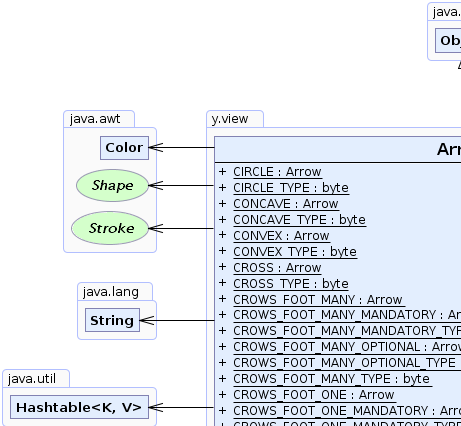
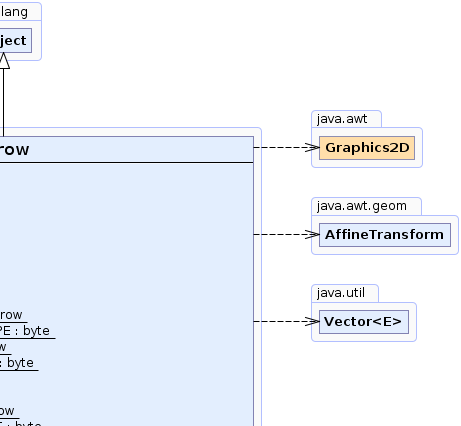
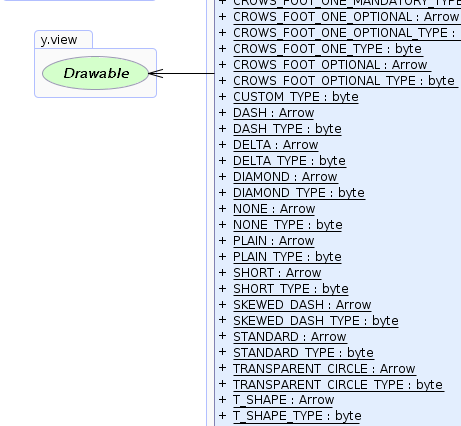
Predefined arrow types:
 |
 |
 |
 |
 |
 |
| Field Summary | |
|---|---|
static Arrow |
CIRCLE
A uniformly colored arrow that has the shape of a circle. |
static byte |
CIRCLE_TYPE
Arrow type constant that describes arrow CIRCLE. |
static Arrow |
CONCAVE
An arrow consisting of two curves forming a concave shape. |
static byte |
CONCAVE_TYPE
Arrow type constant that describes arrow CONCAVE. |
static Arrow |
CONVEX
An arrow consisting of two curves forming a convex shape. |
static byte |
CONVEX_TYPE
Arrow type constant that describes arrow CONVEX. |
static Arrow |
CROSS
An arrow that has the shape of a cross whose bars are crossing the edge at an angle of 45 degrees. |
static byte |
CROSS_TYPE
Arrow type constant that describes arrow CROSS. |
static Arrow |
CROWS_FOOT_MANY
An arrow used in Crow's Foot notation to signal that the entity pointed to by this arrow is in a M:N relationship with another entity. |
static Arrow |
CROWS_FOOT_MANY_MANDATORY
An arrow used in Crow's Foot notation to signal that the entity pointed to by this arrow is in a mandatory M:N relationship with another entity. |
static byte |
CROWS_FOOT_MANY_MANDATORY_TYPE
Arrow type constant that describes arrow CROWS_FOOT_MANY_MANDATORY. |
static Arrow |
CROWS_FOOT_MANY_OPTIONAL
An arrow used in Crow's Foot notation to signal that the entity pointed to by this arrow is in an optional M:N relationship with another entity. |
static byte |
CROWS_FOOT_MANY_OPTIONAL_TYPE
Arrow type constant that describes arrow CROWS_FOOT_MANY_OPTIONAL. |
static byte |
CROWS_FOOT_MANY_TYPE
Arrow type constant that describes arrow CROWS_FOOT_MANY. |
static Arrow |
CROWS_FOOT_ONE
An arrow used in Crow's Foot notation to signal that the entity pointed to by this arrow is in a 1:N relationship with another entity. |
static Arrow |
CROWS_FOOT_ONE_MANDATORY
An arrow used in Crow's Foot notation to signal that the entity pointed to by this arrow is in a mandatory 1:N relationship with another entity. |
static byte |
CROWS_FOOT_ONE_MANDATORY_TYPE
Arrow type constant that describes arrow CROWS_FOOT_ONE_MANDATORY. |
static Arrow |
CROWS_FOOT_ONE_OPTIONAL
An arrow used in Crow's Foot notation to signal that the entity pointed to by this arrow is in an optional 1:N relationship with another entity. |
static byte |
CROWS_FOOT_ONE_OPTIONAL_TYPE
Arrow type constant that describes arrow CROWS_FOOT_ONE_OPTIONAL. |
static byte |
CROWS_FOOT_ONE_TYPE
Arrow type constant that describes arrow CROWS_FOOT_ONE. |
static Arrow |
CROWS_FOOT_OPTIONAL
An arrow used in Crow's Foot notation to signal that the entity pointed to by this arrow is in an optional relationship with another entity. |
static byte |
CROWS_FOOT_OPTIONAL_TYPE
Arrow type constant that describes arrow CROWS_FOOT_OPTIONAL. |
static byte |
CUSTOM_TYPE
|
static Arrow |
DASH
An arrow that has the shape of a single dash crossing the edge at an angle of 90 degrees. |
static byte |
DASH_TYPE
Arrow type constant that describes arrow DASH. |
static Arrow |
DELTA
A uniformly colored arrow that has the shape of a triangle. |
static byte |
DELTA_TYPE
Arrow type constant that describes arrow DELTA. |
static Arrow |
DIAMOND
A uniformly colored arrow that has the shape of a diamond. |
static byte |
DIAMOND_TYPE
Arrow type constant that describes arrow DIAMOND. |
static Arrow |
NONE
An arrow that does not have a graphical representation. |
static byte |
NONE_TYPE
Arrow type constant that describes arrow NONE. |
static Arrow |
PLAIN
An arrow consisting of two strokes meeting at the tip. |
static byte |
PLAIN_TYPE
Arrow type constant that describes arrow PLAIN. |
static Arrow |
SHORT
An arrow that is short and broad. |
static byte |
SHORT_TYPE
Arrow type constant that describes arrow SHORT. |
static Arrow |
SKEWED_DASH
An arrow that has the shape of a single dash crossing the edge at an angle of 45 degrees. |
static byte |
SKEWED_DASH_TYPE
Arrow type constant that describes arrow SKEWED_DASH. |
static Arrow |
STANDARD
A uniformly colored arrow that has the shape of a triangle with impressed bottom side. |
static byte |
STANDARD_TYPE
Arrow type constant that describes arrow STANDARD. |
static Arrow |
T_SHAPE
An arrow that has the shape of a T. |
static byte |
T_SHAPE_TYPE
Arrow type constant that describes arrow T_SHAPE. |
static Arrow |
TRANSPARENT_CIRCLE
An arrow that has the shape of a circle. |
static byte |
TRANSPARENT_CIRCLE_TYPE
Arrow type constant that describes arrow TRANSPARENT_CIRCLE. |
static Arrow |
WHITE_CIRCLE
An arrow that has the shape of a circle. |
static byte |
WHITE_CIRCLE_TYPE
Arrow type constant that describes arrow WHITE_CIRCLE. |
static Arrow |
WHITE_DELTA
An arrow that has the shape of a triangle. |
static Arrow |
WHITE_DELTA_BAR
An arrow that has the shape of a triangle and a bar parallel to the traingle's bottom line. |
static byte |
WHITE_DELTA_BAR_TYPE
Arrow type constant that describes arrow WHITE_DELTA_BAR. |
static byte |
WHITE_DELTA_TYPE
Arrow type constant that describes arrow WHITE_DELTA. |
static Arrow |
WHITE_DIAMOND
An arrow that has the shape of a diamond. |
static byte |
WHITE_DIAMOND_TYPE
Arrow type constant that describes arrow WHITE_DIAMOND. |
| Method Summary | |
|---|---|
static Arrow |
addCustomArrow(java.lang.String name,
               Arrow existingArrow,
               double clipLength)
Creates, registers and returns a custom arrow that is created using a given arrow but the drawing of the arrow is offset from the corresponding end of the path using the given offset. |
static Arrow |
addCustomArrow(java.lang.String name,
               Drawable drawable)
Adds a new custom arrow with the given name to the set of available custom arrows. |
static Arrow |
addCustomArrow(java.lang.String name,
               Drawable drawable,
               double arrowLength,
               double clipLength)
Adds a new custom arrow with the given name to the set of available custom arrows. |
static Arrow |
addCustomArrow(java.lang.String name,
               java.awt.Shape shape,
               java.awt.Color fillColor)
Adds a new custom arrow with the given name to the set of available custom arrows. |
static Arrow |
addCustomArrow(java.lang.String name,
               java.awt.Shape shape,
               java.awt.Color fillColor,
               java.awt.Stroke lineStroke,
               java.awt.Color lineColor)
Adds a new custom arrow with the given name to the set of available custom arrows. |
static Arrow |
addCustomArrow(java.lang.String name,
               java.awt.Shape shape,
               java.awt.Color fillColor,
               java.awt.Stroke lineStroke,
               java.awt.Color lineColor,
               double arrowLength,
               double clipLength)
Adds a new custom arrow with the given name to the set of available custom arrows. |
static java.util.Vector |
availableArrows()
Returns a vector of all available arrows, i.e. all built in types and all added custom types. |
static Arrow |
getArrow(byte type)
Returns the arrow described by the given arrow type specifier. |
double |
getArrowLength()
Returns the "length" of this arrow. |
double |
getClipLength()
Returns the length of the clip that should be applied to the edge's path before attaching the arrow. |
static Arrow |
getCustomArrow(java.lang.String name)
Returns the custom arrow that was added under the given name. |
java.lang.String |
getCustomName()
If this arrow is a custom arrow it's custom name will be returned. |
static double |
getDefaultClipLength()
Returns the statically shared clipLength of all default arrows. |
java.awt.Shape |
getShape()
Returns the shape of this arrow. |
byte |
getType()
Returns the type of this arrow. |
void |
paint(java.awt.Graphics2D gfx,
      java.awt.geom.AffineTransform t)
Paints an affine transform of this arrow. |
void |
paint(java.awt.Graphics2D g,
      double x,
      double y,
      double dx,
      double dy)
Paints the arrow at a specific position in a specific direction. |
static void |
setDefaultClipLength(double defaultClipLength)
Sets the statically shared clipLength for all default arrows. |
| Methods inherited from class java.lang.Object |
|---|
clone, equals, finalize, getClass, hashCode, notify, notifyAll, toString, wait, wait, wait |
| Field Detail |
|---|
public static final Arrow NONE

public static final Arrow STANDARD

public static final Arrow DELTA

public static final Arrow WHITE_DELTA

public static final Arrow WHITE_DELTA_BAR

public static final Arrow DIAMOND

public static final Arrow SHORT

public static final Arrow WHITE_DIAMOND

public static final Arrow PLAIN

public static final Arrow CONCAVE

public static final Arrow CONVEX

public static final Arrow CIRCLE

public static final Arrow TRANSPARENT_CIRCLE

public static final Arrow WHITE_CIRCLE

public static final Arrow DASH

public static final Arrow SKEWED_DASH

public static final Arrow CROSS

public static final Arrow T_SHAPE

public static final Arrow CROWS_FOOT_ONE_MANDATORY

public static final Arrow CROWS_FOOT_MANY_MANDATORY

public static final Arrow CROWS_FOOT_ONE_OPTIONAL
public static final Arrow CROWS_FOOT_MANY_OPTIONAL
public static final Arrow CROWS_FOOT_ONE

public static final Arrow CROWS_FOOT_MANY

public static final Arrow CROWS_FOOT_OPTIONAL

public static final byte CUSTOM_TYPE
public static final byte NONE_TYPE
NONE.
public static final byte STANDARD_TYPE
STANDARD.
public static final byte DELTA_TYPE
DELTA.
public static final byte WHITE_DELTA_TYPE
WHITE_DELTA.
public static final byte WHITE_DELTA_BAR_TYPE
WHITE_DELTA_BAR.
public static final byte DIAMOND_TYPE
DIAMOND.
public static final byte WHITE_DIAMOND_TYPE
WHITE_DIAMOND.
public static final byte SHORT_TYPE
SHORT.
public static final byte PLAIN_TYPE
PLAIN.
public static final byte CONCAVE_TYPE
CONCAVE.
public static final byte CONVEX_TYPE
CONVEX.
public static final byte CIRCLE_TYPE
CIRCLE.
public static final byte TRANSPARENT_CIRCLE_TYPE
TRANSPARENT_CIRCLE.
public static final byte WHITE_CIRCLE_TYPE
WHITE_CIRCLE.
public static final byte DASH_TYPE
DASH.
public static final byte SKEWED_DASH_TYPE
SKEWED_DASH.
public static final byte CROSS_TYPE
CROSS.
public static final byte T_SHAPE_TYPE
T_SHAPE.
public static final byte CROWS_FOOT_ONE_MANDATORY_TYPE
CROWS_FOOT_ONE_MANDATORY.
public static final byte CROWS_FOOT_MANY_MANDATORY_TYPE
CROWS_FOOT_MANY_MANDATORY.
public static final byte CROWS_FOOT_ONE_OPTIONAL_TYPE
CROWS_FOOT_ONE_OPTIONAL.
public static final byte CROWS_FOOT_MANY_OPTIONAL_TYPE
CROWS_FOOT_MANY_OPTIONAL.
public static final byte CROWS_FOOT_ONE_TYPE
CROWS_FOOT_ONE.
public static final byte CROWS_FOOT_MANY_TYPE
CROWS_FOOT_MANY.
public static final byte CROWS_FOOT_OPTIONAL_TYPE
CROWS_FOOT_OPTIONAL.
| Method Detail |
|---|
public static double getDefaultClipLength()
clipLength of all default arrows.
The default is 0.0d.
public static void setDefaultClipLength(double defaultClipLength)
clipLength for all default arrows.
The default is 0.0d.
defaultClipLength - the length of the clip
public static Arrow addCustomArrow(java.lang.String name,
                                   java.awt.Shape shape,
                                   java.awt.Color fillColor)
public static Arrow addCustomArrow(java.lang.String name,
                                   Arrow existingArrow,
                                   double clipLength)
name - The name to identify the arrow.existingArrow - the existing arrow to wrapclipLength - the clipping length
public static Arrow addCustomArrow(java.lang.String name,
                                   java.awt.Shape shape,
                                   java.awt.Color fillColor,
                                   java.awt.Stroke lineStroke,
                                   java.awt.Color lineColor)
public static Arrow addCustomArrow(java.lang.String name,
                                   java.awt.Shape shape,
                                   java.awt.Color fillColor,
                                   java.awt.Stroke lineStroke,
                                   java.awt.Color lineColor,
                                   double arrowLength,
                                   double clipLength)
public static Arrow addCustomArrow(java.lang.String name,
                                   Drawable drawable)
public static Arrow addCustomArrow(java.lang.String name,
                                   Drawable drawable,
                                   double arrowLength,
                                   double clipLength)
public static Arrow getCustomArrow(java.lang.String name)
public static java.util.Vector availableArrows()
public static Arrow getArrow(byte type)
type - one of NONE_TYPE, STANDARD_TYPE,
DELTA_TYPE, WHITE_DELTA_TYPE, DIAMOND_TYPE,
WHITE_DIAMOND_TYPE.public byte getType()
public java.lang.String getCustomName()
null will be returned.
public java.awt.Shape getShape()
public void paint(java.awt.Graphics2D g,
                  double x,
                  double y,
                  double dx,
                  double dy)
public void paint(java.awt.Graphics2D gfx,
                  java.awt.geom.AffineTransform t)
t - The affine transform being applied to the arrow before
painting.public double getArrowLength()
calculation
of the path of an EdgeRealizer to clip the ends of the path by the given value, so that
the drawing of the path does not corrupt the drawing of the Arrow.
public double getClipLength()
0.0d
|
© Copyright 2000-2022, yWorks GmbH. All rights reserved. |
||||||||
| PREV CLASS NEXT CLASS | FRAMES NO FRAMES | ||||||||
| SUMMARY: NESTED | FIELD | CONSTR | METHOD | DETAIL: FIELD | CONSTR | METHOD | ||||||||