 java.awt.Component
java.awt.Container
javax.swing.JComponent
javax.swing.JPanel
y.view.NavigationComponent
java.awt.Component
java.awt.Container
javax.swing.JComponent
javax.swing.JPanel
y.view.NavigationComponent
|
Search this API | ||||||||
| PREV CLASS NEXT CLASS | FRAMES NO FRAMES | ||||||||
| SUMMARY: NESTED | FIELD | CONSTR | METHOD | DETAIL: FIELD | CONSTR | METHOD | ||||||||
java.lang.Object
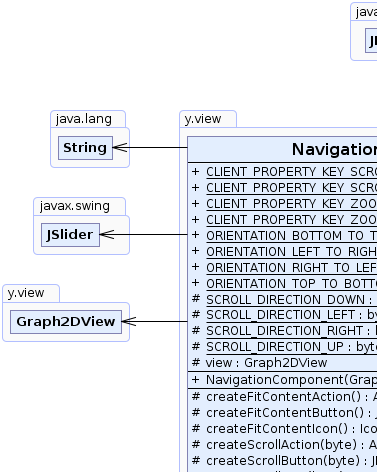
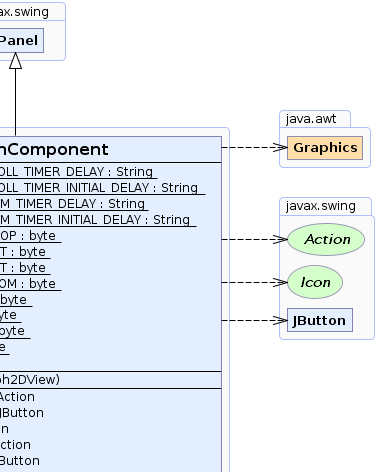
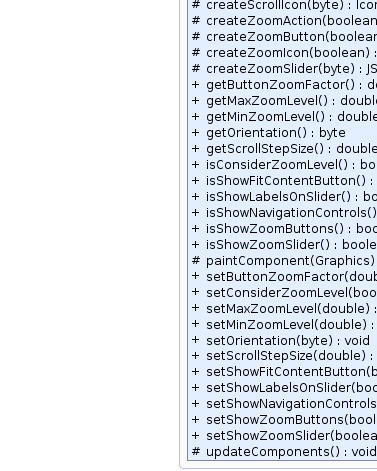
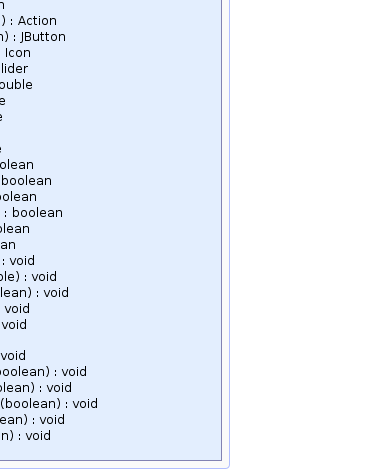
public class NavigationComponent
This component provides several controls to navigate inside a graph.
The component consists of two main control groups named navigation controls and zoom controls. The navigation
controls consist of 4 button, that provide a scroll functionality and one button to fit the graph content to the view.
The zoom controls consist of a zoom slider and two buttons to zoom in and zoom out.
One can define the alignment of both control groups to each other using method setOrientation(byte).
The fit content button inside the navigation controls can be disabled using method
setShowFitContentButton(boolean). Furthermore the zoom in and zoom out buttons can be hidden
setShowZoomButtons(boolean).
The step size used for the navigation buttons can be determined using method setScrollStepSize(double). By
default this step size is 10 pixels for zoom level 1 and the step size will scale with the zoom level. This can be
disabled using method setConsiderZoomLevel(boolean).
When using the scroll buttons of the navigation controls, one can determine the repeat timer delay of those buttons
by setting client property CLIENT_PROPERTY_KEY_SCROLL_TIMER_DELAY JComponent.putClientProperty(Object, Object)
(e.g. to new Integer(60) which is default).
Accordingly the initial timer delay can be set CLIENT_PROPERTY_KEY_SCROLL_TIMER_INITIAL_DELAY.
(e.g. to new Integer(300), which is default).
When using the zoom buttons of the zoom controls, one can determine the repeat timer delay of those buttons
by setting client property CLIENT_PROPERTY_KEY_ZOOM_TIMER_DELAY JComponent.putClientProperty(Object, Object)
(e.g. to new Integer(60) which is default).
Accordingly the initial timer delay can be set CLIENT_PROPERTY_KEY_ZOOM_TIMER_INITIAL_DELAY.
(e.g. to new Integer(300), which is default).
When using the fit content button setShowFitContentButton(boolean) one can determine whether the view
transformation shall be animated or not by setting client property "NavigationComponent.AnimateFitContent". By
default the animation is not enabled. JComponent.putClientProperty(Object, Object) to Boolean.TRUE;
 |
 |
 |
 |
| Nested Class Summary |
|---|
| Nested classes/interfaces inherited from class javax.swing.JPanel |
|---|
javax.swing.JPanel.AccessibleJPanel |
| Nested classes/interfaces inherited from class javax.swing.JComponent |
|---|
javax.swing.JComponent.AccessibleJComponent |
| Nested classes/interfaces inherited from class java.awt.Container |
|---|
java.awt.Container.AccessibleAWTContainer |
| Nested classes/interfaces inherited from class java.awt.Component |
|---|
java.awt.Component.AccessibleAWTComponent, java.awt.Component.BaselineResizeBehavior, java.awt.Component.BltBufferStrategy, java.awt.Component.FlipBufferStrategy |
| Field Summary | |
|---|---|
static java.lang.String |
CLIENT_PROPERTY_KEY_SCROLL_TIMER_DELAY
Used as key when setting the timer delay client property JComponent.putClientProperty(Object, Object) for the scroll
buttons. |
static java.lang.String |
CLIENT_PROPERTY_KEY_SCROLL_TIMER_INITIAL_DELAY
Used as key when setting the initial timer delay client property JComponent.putClientProperty(Object, Object) for the
scroll buttons. |
static java.lang.String |
CLIENT_PROPERTY_KEY_ZOOM_TIMER_DELAY
Used as key when setting the timer delay client property JComponent.putClientProperty(Object, Object) for the zoom
buttons. |
static java.lang.String |
CLIENT_PROPERTY_KEY_ZOOM_TIMER_INITIAL_DELAY
Used as key when setting the initial timer delay client property JComponent.putClientProperty(Object, Object) for the
zoom buttons. |
static byte |
ORIENTATION_BOTTOM_TO_TOP
Orientation specifier that is used to determine how the navigation controls and the zoom controls are aligned. |
static byte |
ORIENTATION_LEFT_TO_RIGHT
Orientation specifier that is used to determine how the navigation controls and the zoom controls are aligned. |
static byte |
ORIENTATION_RIGHT_TO_LEFT
Orientation specifier that is used to determine how the navigation controls and the zoom controls are aligned. |
static byte |
ORIENTATION_TOP_TO_BOTTOM
Orientation specifier that is used to determine how the navigation controls and the zoom controls are aligned. |
protected static byte |
SCROLL_DIRECTION_DOWN
|
protected static byte |
SCROLL_DIRECTION_LEFT
|
protected static byte |
SCROLL_DIRECTION_RIGHT
|
protected static byte |
SCROLL_DIRECTION_UP
|
protected Graph2DView |
view
|
| Fields inherited from class javax.swing.JComponent |
|---|
accessibleContext, listenerList, TOOL_TIP_TEXT_KEY, ui, UNDEFINED_CONDITION, WHEN_ANCESTOR_OF_FOCUSED_COMPONENT, WHEN_FOCUSED, WHEN_IN_FOCUSED_WINDOW |
| Fields inherited from class java.awt.Component |
|---|
BOTTOM_ALIGNMENT, CENTER_ALIGNMENT, LEFT_ALIGNMENT, RIGHT_ALIGNMENT, TOP_ALIGNMENT |
| Fields inherited from interface java.awt.image.ImageObserver |
|---|
ABORT, ALLBITS, ERROR, FRAMEBITS, HEIGHT, PROPERTIES, SOMEBITS, WIDTH |
| Constructor Summary | |
|---|---|
NavigationComponent(Graph2DView view)
|
|
| Method Summary | |
|---|---|
protected javax.swing.Action |
createFitContentAction()
Creates the action that will be assigned to the fit content button createFitContentButton(). |
protected javax.swing.JButton |
createFitContentButton()
Creates the button in the middle of the navigation controls. |
protected javax.swing.Icon |
createFitContentIcon()
This method can be overwritten to return a custom icon for the created fit content action createFitContentAction() |
protected javax.swing.Action |
createScrollAction(byte direction)
Creates an action that will scroll the view. |
protected javax.swing.JButton |
createScrollButton(byte direction)
|
protected javax.swing.Icon |
createScrollIcon(byte direction)
This method can be overwritten to return a custom icon for the created scroll buttons createScrollButton(byte). |
protected javax.swing.Action |
createZoomAction(boolean zoomIn)
Creates the action that will be assigned to the zoom buttons createZoomButton(boolean). |
protected javax.swing.JButton |
createZoomButton(boolean zoomIn)
Creates the buttons above and below the zoom slider. |
protected javax.swing.Icon |
createZoomIcon(boolean zoomIn)
This method can be overwritten to return a custom icon for the created zoom icons createZoomIcon(boolean). |
protected javax.swing.JSlider |
createZoomSlider(byte orientation)
Creates the zoom slider that is used to zoom in and out of the graph. |
double |
getButtonZoomFactor()
Returns the step size that is used by the zoom buttons to zoom in and out of the view. |
double |
getMaxZoomLevel()
|
double |
getMinZoomLevel()
|
byte |
getOrientation()
Returns an orientation specifier that is used to determine how the navigation controls and the zoom controls are aligned. |
double |
getScrollStepSize()
Returns the step size used for the navigation buttons. |
boolean |
isConsiderZoomLevel()
Returns whether the navigation scroll buttons shall take the zoom level into account when scrolling. |
boolean |
isShowFitContentButton()
Whether the fit content button is shown. |
boolean |
isShowLabelsOnSlider()
Returns whether labels and ticks are on the zoom slider. |
boolean |
isShowNavigationControls()
Whether or not the navigation controls are shown. |
boolean |
isShowZoomButtons()
Whether the zoom in and zoom out buttons are shown. |
boolean |
isShowZoomSlider()
Whether the zoom slider is shown or not. |
protected void |
paintComponent(java.awt.Graphics g)
|
void |
setButtonZoomFactor(double factor)
Sets the steps in which the zoom in and zoom out buttons will zoom the view. |
void |
setConsiderZoomLevel(boolean considerZoomLevel)
Determines whether the navigation scroll buttons shall take the zoom level into account when scrolling. |
void |
setMaxZoomLevel(double maxZoomLevel)
Sets the maximum zoom level the zoom slider will zoom to. |
void |
setMinZoomLevel(double minZoomLevel)
Sets the minimum zoom level the zoom slider will zoom to. |
void |
setOrientation(byte orientation)
Sets the orientation specifier that is used to determine how the navigation controls and the zoom controls are aligned. |
void |
setScrollStepSize(double stepSize)
Determines the step size used for the navigation buttons. |
void |
setShowFitContentButton(boolean showFitContentButton)
Whether the fit content button shall be shown. |
void |
setShowLabelsOnSlider(boolean showLabels)
Whether to show labels and ticks on the zoom slider. |
void |
setShowNavigationControls(boolean showNavigationControls)
Determines whether or not the navigation controls are shown. |
void |
setShowZoomButtons(boolean showZoomButtons)
Determines whether the zoom in and zoom out buttons shall be shown. |
void |
setShowZoomSlider(boolean showZoomSlider)
Determines whether the zoom slider shall be shown. |
protected void |
updateComponents()
Will fill the main panel with the components specified by the diverse settings. |
| Methods inherited from class javax.swing.JPanel |
|---|
getAccessibleContext, getUI, getUIClassID, paramString, setUI, updateUI |
| Methods inherited from class javax.swing.JComponent |
|---|
addAncestorListener, addNotify, addVetoableChangeListener, computeVisibleRect, contains, createToolTip, disable, enable, firePropertyChange, firePropertyChange, firePropertyChange, fireVetoableChange, getActionForKeyStroke, getActionMap, getAlignmentX, getAlignmentY, getAncestorListeners, getAutoscrolls, getBaseline, getBaselineResizeBehavior, getBorder, getBounds, getClientProperty, getComponentGraphics, getComponentPopupMenu, getConditionForKeyStroke, getDebugGraphicsOptions, getDefaultLocale, getFontMetrics, getGraphics, getHeight, getInheritsPopupMenu, getInputMap, getInputMap, getInputVerifier, getInsets, getInsets, getListeners, getLocation, getMaximumSize, getMinimumSize, getNextFocusableComponent, getPopupLocation, getPreferredSize, getRegisteredKeyStrokes, getRootPane, getSize, getToolTipLocation, getToolTipText, getToolTipText, getTopLevelAncestor, getTransferHandler, getVerifyInputWhenFocusTarget, getVetoableChangeListeners, getVisibleRect, getWidth, getX, getY, grabFocus, isDoubleBuffered, isLightweightComponent, isManagingFocus, isOpaque, isOptimizedDrawingEnabled, isPaintingForPrint, isPaintingTile, isRequestFocusEnabled, isValidateRoot, paint, paintBorder, paintChildren, paintImmediately, paintImmediately, print, printAll, printBorder, printChildren, printComponent, processComponentKeyEvent, processKeyBinding, processKeyEvent, processMouseEvent, processMouseMotionEvent, putClientProperty, registerKeyboardAction, registerKeyboardAction, removeAncestorListener, removeNotify, removeVetoableChangeListener, repaint, repaint, requestDefaultFocus, requestFocus, requestFocus, requestFocusInWindow, requestFocusInWindow, resetKeyboardActions, reshape, revalidate, scrollRectToVisible, setActionMap, setAlignmentX, setAlignmentY, setAutoscrolls, setBackground, setBorder, setComponentPopupMenu, setDebugGraphicsOptions, setDefaultLocale, setDoubleBuffered, setEnabled, setFocusTraversalKeys, setFont, setForeground, setInheritsPopupMenu, setInputMap, setInputVerifier, setMaximumSize, setMinimumSize, setNextFocusableComponent, setOpaque, setPreferredSize, setRequestFocusEnabled, setToolTipText, setTransferHandler, setUI, setVerifyInputWhenFocusTarget, setVisible, unregisterKeyboardAction, update |
| Methods inherited from class java.awt.Container |
|---|
add, add, add, add, add, addContainerListener, addImpl, addPropertyChangeListener, addPropertyChangeListener, applyComponentOrientation, areFocusTraversalKeysSet, countComponents, deliverEvent, doLayout, findComponentAt, findComponentAt, getComponent, getComponentAt, getComponentAt, getComponentCount, getComponents, getComponentZOrder, getContainerListeners, getFocusTraversalKeys, getFocusTraversalPolicy, getLayout, getMousePosition, insets, invalidate, isAncestorOf, isFocusCycleRoot, isFocusCycleRoot, isFocusTraversalPolicyProvider, isFocusTraversalPolicySet, layout, list, list, locate, minimumSize, paintComponents, preferredSize, printComponents, processContainerEvent, processEvent, remove, remove, removeAll, removeContainerListener, setComponentZOrder, setFocusCycleRoot, setFocusTraversalPolicy, setFocusTraversalPolicyProvider, setLayout, transferFocusBackward, transferFocusDownCycle, validate, validateTree |
| Methods inherited from class java.awt.Component |
|---|
action, add, addComponentListener, addFocusListener, addHierarchyBoundsListener, addHierarchyListener, addInputMethodListener, addKeyListener, addMouseListener, addMouseMotionListener, addMouseWheelListener, bounds, checkImage, checkImage, coalesceEvents, contains, createImage, createImage, createVolatileImage, createVolatileImage, disableEvents, dispatchEvent, enable, enableEvents, enableInputMethods, firePropertyChange, firePropertyChange, firePropertyChange, firePropertyChange, firePropertyChange, firePropertyChange, getBackground, getBounds, getColorModel, getComponentListeners, getComponentOrientation, getCursor, getDropTarget, getFocusCycleRootAncestor, getFocusListeners, getFocusTraversalKeysEnabled, getFont, getForeground, getGraphicsConfiguration, getHierarchyBoundsListeners, getHierarchyListeners, getIgnoreRepaint, getInputContext, getInputMethodListeners, getInputMethodRequests, getKeyListeners, getLocale, getLocation, getLocationOnScreen, getMouseListeners, getMouseMotionListeners, getMousePosition, getMouseWheelListeners, getName, getParent, getPeer, getPropertyChangeListeners, getPropertyChangeListeners, getSize, getToolkit, getTreeLock, gotFocus, handleEvent, hasFocus, hide, imageUpdate, inside, isBackgroundSet, isCursorSet, isDisplayable, isEnabled, isFocusable, isFocusOwner, isFocusTraversable, isFontSet, isForegroundSet, isLightweight, isMaximumSizeSet, isMinimumSizeSet, isPreferredSizeSet, isShowing, isValid, isVisible, keyDown, keyUp, list, list, list, location, lostFocus, mouseDown, mouseDrag, mouseEnter, mouseExit, mouseMove, mouseUp, move, nextFocus, paintAll, postEvent, prepareImage, prepareImage, processComponentEvent, processFocusEvent, processHierarchyBoundsEvent, processHierarchyEvent, processInputMethodEvent, processMouseWheelEvent, remove, removeComponentListener, removeFocusListener, removeHierarchyBoundsListener, removeHierarchyListener, removeInputMethodListener, removeKeyListener, removeMouseListener, removeMouseMotionListener, removeMouseWheelListener, removePropertyChangeListener, removePropertyChangeListener, repaint, repaint, repaint, resize, resize, setBounds, setBounds, setComponentOrientation, setCursor, setDropTarget, setFocusable, setFocusTraversalKeysEnabled, setIgnoreRepaint, setLocale, setLocation, setLocation, setName, setSize, setSize, show, show, size, toString, transferFocus, transferFocusUpCycle |
| Methods inherited from class java.lang.Object |
|---|
clone, equals, finalize, getClass, hashCode, notify, notifyAll, wait, wait, wait |
| Field Detail |
|---|
public static final byte ORIENTATION_TOP_TO_BOTTOM
public static final byte ORIENTATION_LEFT_TO_RIGHT
public static final byte ORIENTATION_BOTTOM_TO_TOP
public static final byte ORIENTATION_RIGHT_TO_LEFT
public static final java.lang.String CLIENT_PROPERTY_KEY_SCROLL_TIMER_DELAY
JComponent.putClientProperty(Object, Object) for the scroll
buttons. When keeping the button pressed the according action will be triggered continuously. The interval in milli
seconds can be set using the client property. Default is 60.
public static final java.lang.String CLIENT_PROPERTY_KEY_SCROLL_TIMER_INITIAL_DELAY
JComponent.putClientProperty(Object, Object) for the
scroll buttons. The initial delay (in milliseconds) will determine after which period of time the action shall be
triggered continuously. Default is 300.
public static final java.lang.String CLIENT_PROPERTY_KEY_ZOOM_TIMER_DELAY
JComponent.putClientProperty(Object, Object) for the zoom
buttons. When keeping the button pressed the according action will be triggered continuously. The interval in milli
seconds can be set using the client property. Default is 60.
public static final java.lang.String CLIENT_PROPERTY_KEY_ZOOM_TIMER_INITIAL_DELAY
JComponent.putClientProperty(Object, Object) for the
zoom buttons. The initial delay (in milliseconds) will determine after which period of time the action shall be
triggered continuously. Default is 300.
protected static final byte SCROLL_DIRECTION_UP
protected static final byte SCROLL_DIRECTION_DOWN
protected static final byte SCROLL_DIRECTION_RIGHT
protected static final byte SCROLL_DIRECTION_LEFT
protected final Graph2DView view
| Constructor Detail |
|---|
public NavigationComponent(Graph2DView view)
| Method Detail |
|---|
protected void paintComponent(java.awt.Graphics g)
paintComponent in class javax.swing.JComponentprotected void updateComponents()
protected javax.swing.JButton createScrollButton(byte direction)
direction - the direction to which the created button shall scroll.
One of SCROLL_DIRECTION_UP, SCROLL_DIRECTION_DOWN, SCROLL_DIRECTION_LEFT,
SCROLL_DIRECTION_RIGHT
createScrollIcon(byte)protected javax.swing.Action createScrollAction(byte direction)
direction - the direction in which scrolling shall happen.
protected javax.swing.Icon createScrollIcon(byte direction)
createScrollButton(byte).
direction - the direction to which the created button shall scroll.
One of SCROLL_DIRECTION_UP, SCROLL_DIRECTION_DOWN, SCROLL_DIRECTION_LEFT,
SCROLL_DIRECTION_RIGHT.
createScrollButton(byte)protected javax.swing.JButton createFitContentButton()
createFitContentAction().
createFitContentAction()createFitContentAction(),
createFitContentIcon(),
setShowFitContentButton(boolean)protected javax.swing.Action createFitContentAction()
createFitContentButton(). By default
when first triggering this action, it will fit the graph to the current view dimensions and by triggering it a
second time, it will zoom back to the previous zoom level and view coordinate. This allows some kind of quick
birds-eye view on the graph.
The icon of this action can be customized by overwriting createFitContentIcon().
createFitContentButton(),
createFitContentIcon()protected javax.swing.Icon createFitContentIcon()
createFitContentAction()
createFitContentButton()protected javax.swing.JButton createZoomButton(boolean zoomIn)
createZoomAction(boolean).
zoomIn - whether a zoom in button (true) or a zoom out button (false) shall be created.
createZoomAction(boolean).(boolean),
createZoomIcon(boolean),
setShowZoomButtons(boolean)protected javax.swing.Action createZoomAction(boolean zoomIn)
createZoomButton(boolean). By default an
action is returned that will zoom in (if zoomIn is true) or zoom out (if zoomIn is false) of the view.
The icon of this action can be customized by overwriting createZoomIcon(boolean).
zoomIn - whether an action shall be created to zoom into the view (true) or out of the view (false)
createZoomButton(boolean)createZoomButton(boolean),
createZoomIcon(boolean),
setShowZoomButtons(boolean)protected javax.swing.Icon createZoomIcon(boolean zoomIn)
createZoomIcon(boolean).
zoomIn - whether an icon for a zoom in button (true) or a zoom out button (false) shall be created.
createZoomButton(boolean)protected javax.swing.JSlider createZoomSlider(byte orientation)
orientation - the orientation of the main component, that also is used to determine the slider orientation.
ORIENTATION_LEFT_TO_RIGHT and ORIENTATION_RIGHT_TO_LEFT will usually lead to a horizontal slider,
while ORIENTATION_TOP_TO_BOTTOM and ORIENTATION_BOTTOM_TO_TOP will lead to a vertical slider.
The default preferred slider size is set to 100 height (vertical orientation) or 100 width (horizontal orientation).
public boolean isShowNavigationControls()
createScrollButton(byte) and a button to fit the content created using createFitContentButton().
By default all navigation controls are shown.
One can specify to not show the fit content button using method showFitContentButton.
public void setShowNavigationControls(boolean showNavigationControls)
createScrollButton(byte) and a button to fit the content created using createFitContentButton().
By default all navigation controls are shown.
One can specify to not show the fit content button using method setShowFitContentButton(boolean).
showNavigationControls - public boolean isShowFitContentButton()
setShowNavigationControls(boolean)public void setShowFitContentButton(boolean showFitContentButton)
showFitContentButton - setShowNavigationControls(boolean)public boolean isShowZoomButtons()
public void setShowZoomButtons(boolean showZoomButtons)
showZoomButtons - public boolean isShowZoomSlider()
public void setShowZoomSlider(boolean showZoomSlider)
showZoomSlider - public double getScrollStepSize()
setConsiderZoomLevel(boolean)public void setScrollStepSize(double stepSize)
stepSize - the step size that is used for the navigation buttons. If the zoom level is being considered, the
step size is taken as the step size for zoom level 1.setConsiderZoomLevel(boolean)public void setButtonZoomFactor(double factor)
factor - the factor with which to zoom in / zoom out. Must be greater than 1.
Default is (1.1). If you want to double the view / divide it by 2 per click, the according value would be 2.setShowZoomButtons(boolean),
createZoomButton(boolean)public double getButtonZoomFactor()
setShowZoomButtons(boolean),
createZoomButton(boolean)public void setShowLabelsOnSlider(boolean showLabels)
showLabels - true if labels shall be shown, false otherwise. Default is false.setShowZoomSlider(boolean),
createZoomSlider(byte)public boolean isShowLabelsOnSlider()
setShowZoomSlider(boolean),
createZoomSlider(byte)public void setMaxZoomLevel(double maxZoomLevel)
maxZoomLevel - the maximum zoom level the can be zoomed to using the sliderpublic double getMaxZoomLevel()
public void setMinZoomLevel(double minZoomLevel)
minZoomLevel - the minimum zoom level that can be zoomed to using the sliderpublic double getMinZoomLevel()
public byte getOrientation()
ORIENTATION_TOP_TO_BOTTOM (default), ORIENTATION_RIGHT_TO_LEFT,
ORIENTATION_BOTTOM_TO_TOP, ORIENTATION_LEFT_TO_RIGHT.public void setOrientation(byte orientation)
orientation - One of ORIENTATION_TOP_TO_BOTTOM (default), ORIENTATION_RIGHT_TO_LEFT,
ORIENTATION_BOTTOM_TO_TOP, ORIENTATION_LEFT_TO_RIGHT.public boolean isConsiderZoomLevel()
setScrollStepSize(double) will then be increased for zoom levels
smaller than "1" and decreased for zoom levels greater than "1".
public void setConsiderZoomLevel(boolean considerZoomLevel)
setScrollStepSize(double) will then be increased for zoom levels
smaller than "1" and decreased for zoom levels greater than "1".
considerZoomLevel -
|
© Copyright 2000-2022, yWorks GmbH. All rights reserved. |
||||||||
| PREV CLASS NEXT CLASS | FRAMES NO FRAMES | ||||||||
| SUMMARY: NESTED | FIELD | CONSTR | METHOD | DETAIL: FIELD | CONSTR | METHOD | ||||||||