
PlatformsVariant-specific details

For a flexible future
yFiles — the diagramming SDK -
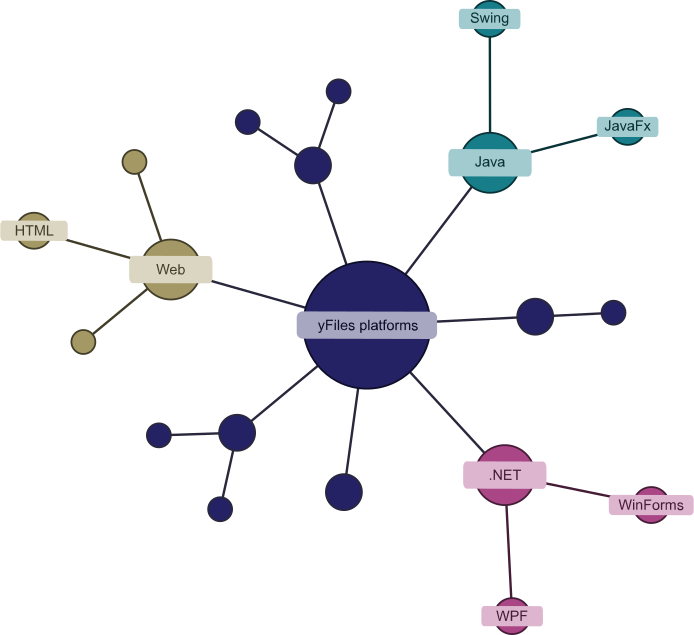
is available for 5 different platforms and technologies: HTML, JavaFX, Java (Swing), WinForms and WPF.
Although these are separate products, their similar structure with comparable
APIs makes it easy to switch between the various platforms.
So you can always get the latest technology
without having to start from scratch.
What can I do with yFiles?
What to expect on this page
The yFiles variants


Software evolves over time, and so does yFiles. We develop the diagramming SDK for new technologies as these become established. And although we support outdated yFiles versions for a very long time, we have to say goodbye at some point.
Software changes over time, and so does yFiles. More information about older yFiles variants that are no longer supported can be found here:
Outdated technologiesWeb platform
Diagramming in the browser
yFiles for HTML is an extensive JavaScript/HTML5 library that adds diagramming functionality to your HTML5/JavaScript project. It lets you create cutting-edge custom apps while easily integrating with your existing web solutions and dashboards.Technical features
Developer-friendly
Extensive Developer’s Guide and API documentation, runtime type-checking, debugging tools, plus code completion and quick API lookup in most IDEs.Pure JavaScript
A pure JavaScript solution that works seamlessly with Angular, React, Vue.js, and basically any other JavaScript framework.100% client-side
100% client-side graph drawing and graph editing — no server component or browser plugin required.TypeScript and GWT support
The complete set of type definitions is available for TypeScript and GWT.More detailed information

Find helpful resources like Developer’s Guides, API documentation and videos.

Explore our versatile demos’ source code on GitHub to enhance your project.

Our live demos, created with yFiles for HTML, work directly in your browser.

Check out the latest changes, new features, and bug fixes in yFiles for HTML 3.0.0.4.

Find the right license and accurate pricing information for your specific use case.

Get started right away! Test yFiles for HTML free of charge. Includes free access to our high-quality support.
Java platform
yFiles for JavaFX
yFiles for JavaFX introduces the robust power and simplicity of yFiles diagramming to your advanced JavaFX™ applications.The library contains UI controls for drawing, viewing, and editing diagrams — along with our highly advanced graph layout algorithms for automatically arranging complex graphs and networks at the click of a button.
Technical requirements
Building applications based on yFiles for JavaFX requires a Java SE Development Kit 8 or newer with matching JavaFX modules.Technical features
Developer-friendly
Extensive Developer’s Guide and API documentation. Supports IntelliSense and thus code completion and API documentation.Supports FXML templating
FXML may be used to define graphical representation for items. Context-sensitive visualizations are possible thanks to support for data binding.Self-contained
Completely self-contained with no dependencies besides Java’s core library.CSS styling
Customize built-in visual decorations such as selection highlights with Cascading Style Sheets (CSS).More detailed information
Find helpful materials like Developer’s Guide, API documentation and videos.
Explore the source code of our versatile demos on GitHub to build on to your project.
Our live demos, created with yFiles for HTML, work directly in your browser. Corresponding demos are part of the yFiles for JavaFX download.
Check out the latest changes, new features, and bug fixes in yFiles for JavaFX 3.6.0.1.
Find the right license and accurate pricing information for your specific use case.
Get started right away! Test yFiles for JavaFX free of charge. Includes free access to our high-quality support.
yFiles for Java (Swing)
yFiles for Java (Swing) is an extensive Java™ class library for the Java Swing world. The current 3.x line requires Java 8 and uses a modern API that contains UI controls for drawing, viewing, and editing diagrams — as well as our many advanced graph layout algorithms for automatically arranging complex graphs.yFiles for Java (Classic)
For projects that need to support legacy Java versions before Java 8, the 2.x line of yFiles for Java supports Java 7 and earlier. It uses an older API design and provides fewer features out-of-the-box than the 3.x line.In new Java Swing projects, we recommend starting development with the 3.x line of yFiles for Java (Swing).
Technical requirements
Building applications based on yFiles for Java (Swing) requires the Java SE Development Kit 8 or newer.If you need to support Java 7 and earlier, we recommend the 2.x line of yFiles for Java.
Technical features
Developer-friendly
Extensive Developer’s Guide and API documentation. Supports code completion and API documentation.100% Swing
Provides a pure Swing component for displaying diagrams. Leverages Java 2D for all visualizations.Self-contained
Completely self-contained with no dependencies besides Java's core library.NonNull/Nullable annotations
Integrates well with JVM languages that provide null-safe type systems, for example Kotlin.Supports Java 8 and newer
Supports all modern Java language features including lambda expressions, default methods, streams, and generics.More detailed information
Find helpful materials like Developer’s Guide, API documentation and videos.
Explore our versatile demos' source code on GitHub to enhance your projects.
Our live demos, created with yFiles for HTML, work directly in your browser. Corresponding demos are part of the yFiles for Java (Swing) download.
Check out the latest changes, new features, and bug fixes in yFiles for Java (Swing) 3.6.0.1.
Find the right license and accurate pricing information for your specific use case.
Get started right away! Test yFiles for Java (Swing) free of charge. Includes free access to our high-quality support.
.NET platform
Diagramming for the .NET environment
yFiles.NET (WinForms) is an extensive Windows Forms programming library for the Microsoft .NET environment. It provides first-class UI controls for viewing, editing, and analyzing diagrams. This lets you create feature-rich Windows Forms-based diagramming applications.Its top-notch data structures and sophisticated layout algorithms allow you to automatically arrange complex graphs, diagrams, and networks at the click of a button.
Technical requirements
For software development with yFiles.NET (WinForms), you need the Microsoft .NET 6.0 SDK (or newer) or the Microsoft .NET Framework 4.6.2 SDK (or newer). A suitable IDE like Microsoft Visual Studio or JetBrains Rider is recommended.Technical features
Developer-friendly
Extensive Developer’s Guide and API documentation. Supports IntelliSense and thus code completion and API documentation.Supports high-DPI devices
yFiles supports individual scaling and DPI-aware scaling to improve user experience on high-DPI devices.Support for all .NET variants
.NET Framework, .NET 6 to 10. yFiles follows you wherever .NET goes.NuGet support
The yFiles.NET (WinForms) assemblies can be easily bundled into NuGet packages. The packages support multiple targets.More detailed information
Find helpful materials like Developer’s Guide, API documentation and videos.
Explore our versatile demos' source code on GitHub to enhance your project.
Our live demos, created with yFiles for HTML, work directly in your browser. Corresponding demos are part of the yFiles.NET (WinForms) download.
Check out the latest changes, new features, and bug fixes in yFiles.NET (WinForms) 6.0.
Find the right license and accurate pricing information for your specific use case.
Get started right away! Test yFiles.NET (WinForms) free of charge. Includes free access to our high-quality support.
Diagramming for the .NET environment
yFiles WPF is an extensive .NET programming library for Windows Presentation Foundation (WPF) applications.It provides first-class UI controls for viewing, editing, and analyzing diagrams. The yFiles WPF programming library lets you create stunning WPF diagramming applications that use the full range of possibilities provided by the Windows Presentation Foundation.
Its sophisticated layout algorithms allow you to automatically arrange complex graphs, diagrams, and networks at the click of a button.
Technical requirements
For software development with yFiles WPF, you need the Microsoft .NET 6.0 SDK (or newer) or the Microsoft .NET Framework 4.6.2 SDK (or newer). A suitable IDE like Microsoft Visual Studio or JetBrains Rider is recommended.Technical features
Developer-friendly
Extensive Developer’s Guide and API documentation. Supports IntelliSense and thus code completion and API documentation.NuGet support
The yFiles WPF assemblies can be easily bundled into NuGet packages. The packages support multiple targets.WPF templating
Visualize graphs with native WPF visualization controls. XAML templates and data binding make complex item visualizations easy.Support for all .NET variants
.NET Framework, .NET 6 to 10. yFiles follows you wherever .NET goes.More detailed information
Find helpful materials like Developer’s Guide, API documentation and videos.
Explore our versatile demos' source code on GitHub to enhance your project.
Our live demos, created with yFiles for HTML, work directly in your browser. Corresponding demos are part of the yFiles WPF download.
Check out the latest changes, new features, and bug fixes in yFiles WPF 4.0.
Find the right license and accurate pricing information for your use case.
Get started right away! Test yFiles WPF free of charge. Includes free access to our high-quality support.

yFiles free of charge!
you might want to explore




Why, how, what? —Just ask the diagramming experts!

Our team is happy to advise you – no strings attached. Let's talk about your project and find the perfect solution for your needs!
E-mail: hello@yworks.com
Your message has been sent.
Your request could not be sent. Please reload the page and try again.
If the problem persists, please report the error to webmaster@yworks.com.
Learn more in our privacy policy.